L
O
A
D
I
N
G


Zoho, Odoo, ERPNext, Dynamics 365 and custom ERP, delivered by one accountable team.

We design and build Zoho workflows, approval chains and cross-app automations so routine work moves on its own and people focus on exceptions.
Zoho automation in the UAE combines several layers: workflow rules for actions inside one app, Blueprint in Zoho CRM for enforced step-by-step processes, approval processes in Zoho Books, Expense and Inventory, Zoho Flow for cross-app and third-party handoffs, and Deluge custom functions for logic point-and-click rules cannot handle. A documented automation register keeps track of what runs.
Zoho Automation UAE projects start with a simple question: which tasks does someone in your team repeat every day because the system does not do them? Typical answers are chasing quote approvals on WhatsApp, re-typing a won deal into Zoho Books, emailing the warehouse when a sales order is confirmed, or reminding customers about overdue invoices one by one.
Zoho gives you several automation layers, and choosing the right one matters. Workflow rules handle field updates, emails and tasks inside one app. Blueprint in Zoho CRM enforces a step-by-step process with mandatory checks at each stage. Approval processes in Zoho Books, Expense and Inventory route documents to the right person. Zoho Flow connects Zoho apps with each other and with outside tools, and Deluge custom functions cover the logic that point-and-click rules cannot.
We map each manual step to the simplest layer that solves it, document the logic, test it with real scenarios and hand it over with clear ownership. The aim is fewer moving parts, not more. You can see how this fits our wider business process automation work across other platforms.

The products we configure, integrate and support on projects like this one.


Product names and logos are trademarks of their respective owners and are shown only to identify the software we implement.
If several of these sound familiar, there is time to recover.
Discounts, purchase orders and expense claims are approved over email or chat, so Zoho shows no record of who approved what. Auditors and managers then struggle to trace decisions.
A won deal in CRM is re-entered as a customer and sales order in Books or Inventory. Each re-entry is a chance for a wrong TRN, address or price.
Quote follow-ups, contract renewals and trade license expiry reminders rely on someone remembering. Missed renewals and stale quotes cost revenue quietly.
Earlier admins added workflows over the years without a register. Some fire twice, some contradict each other, and nobody is sure which ones are safe to switch off.
A custom function that calls an external API without error handling fails silently, and records stop syncing until someone notices weeks later.
We treat automation as a small design project with testing, not a list of rules typed into settings.
We sit with the people doing the work and record each manual step, decision point, document and handoff, including the exceptions that make automation tricky.
Each step is mapped to the right tool: a workflow rule, a Blueprint transition, an approval process, a Zoho Flow, a scheduled function or a webhook. We note triggers, conditions and owners.
Automations are built in a sandbox where your plan supports it, or behind test criteria in live, so real customers never receive a draft email.
We test normal cases, edge cases and failures, such as a missing TRN, a zero-rated export or an approver on leave, and confirm the result in each affected app.
We switch automations on in stages, watch logs and failure notifications for the first weeks and adjust conditions where needed.
Every automation goes into a register with purpose, trigger, owner and dependencies, so future changes are safe.
Examples of what we configure; your list will reflect your own processes.
Timelines depend on the number of processes and how many apps they touch. Small packages can finish within a few weeks.
Durations are typical ranges; your plan is agreed after discovery.
Process walk-throughs, review of existing workflows and functions, and a prioritized list of automations.
Written logic for each automation, agreed with process owners before any build starts.
Configuration of rules, Blueprint, approvals, Flow and Deluge functions in a test setup.
Scenario testing with your team, including failure cases and permission checks.
Automations activated in groups with monitoring and fine-tuning.
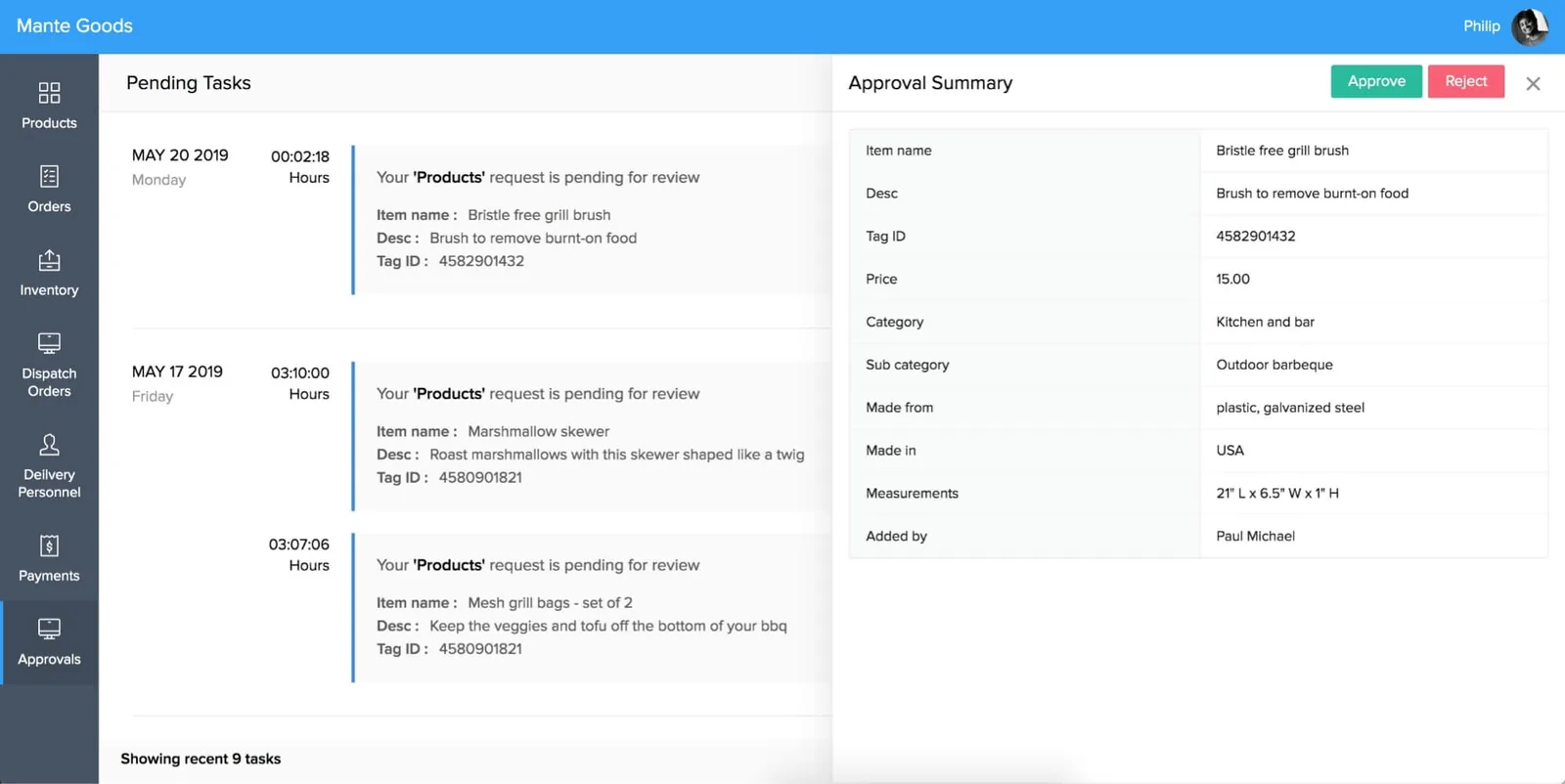
Once automations run, managers need visibility into what is waiting, what was approved and what failed.
We do not promise fixed percentages; these are the improvements teams typically notice.
Approvals recorded inside Zoho show who approved, when and at what value, which helps internal reviews and external audits.
Data flows from CRM to Books or Inventory once, reducing errors in customer details, tax treatment and pricing.
Scheduled reminders and statements reach customers on time without someone building a list each week.
A documented register means new admins can adjust automations without breaking hidden dependencies.
Explore related services and apps.
We configure the system for the rules UAE businesses report against, and test it before go-live.
General information, not tax or legal advice. Confirm current requirements with the FTA, MOHRE or your advisor. See all UAE compliance guides.
On-site workshops in Dubai, Abu Dhabi and Sharjah, and remote or on-site delivery across the Northern Emirates and free zones.
Official sources and references
Facts on this page were checked against these sources in October 2026. Rules change, so confirm current requirements before acting.
Still have a question? Our consultants are happy to help.
Ask an ExpertIf the automation stays inside one app, workflow rules or Blueprint are usually enough. Zoho Flow helps when data must move between apps or to outside systems such as a bank portal, Shopify or a messaging tool. We recommend the simplest option that is reliable.
Yes. Zoho editions set limits on workflow rules, custom functions and API calls. We check your edition's limits during design so automations do not stop working at month-end when volumes peak.
Automation can apply default tax codes, flag missing TRNs or route reverse-charge bills for review, which supports compliance. It should not replace finance judgment, and tax treatment should be confirmed with your tax advisor.
Deluge is Zoho's scripting language for custom functions. It is useful for calculations, validations and integrations that standard rules cannot do. Many automations need no Deluge at all.
Yes. We audit existing rules and functions, find duplicates and conflicts, and propose what to keep, merge or retire before adding anything new.
We build and test with restricted criteria or test records so customer-facing emails are not triggered until you approve go-live.
Tell us how your business runs today and where it gets stuck. We'll recommend the right platform, outline the implementation approach and give you a realistic timeline, with no obligation.
Dubai, United Arab Emirates