L
O
A
D
I
N
G


Zoho, Odoo, ERPNext, Dynamics 365 and custom ERP, delivered by one accountable team.

We set up the Odoo Sales app so your team quotes faster with approved prices, customers sign online, and confirmed orders flow into delivery and VAT invoices.
The Odoo Sales app gives UAE B2B sellers structured quotations with system prices, discounts, payment terms and taxes. Customers can sign, and optionally pay, through the online portal. A confirmed quotation becomes a sales order that triggers delivery in Odoo Inventory, tasks in Odoo Project for services, and an invoice in Odoo Accounting based on ordered or delivered quantities.
Odoo Sales UAE clients are mostly businesses that sell on quotation: distributors quoting contractors, equipment suppliers quoting facility managers, and service firms quoting monthly retainers. Their sales teams often build quotes in Word or Excel, copy prices from an old file, and send PDFs that finance cannot see until an invoice is needed. Discounts get approved verbally, and delivery finds out about an order when the customer calls to chase it.
The Odoo Sales app replaces that with a structured quotation. Products, prices, discounts, payment terms and taxes come from the system, not from memory. A quotation can be emailed or shared through the customer portal, where the buyer can sign and, if you allow it, pay online. Once confirmed it becomes a sales order that triggers a delivery in Odoo Inventory, tasks in Odoo Project for service products, and an invoice in Odoo Accounting.
This page focuses on the order side of selling: pricing, quotations, orders and invoicing rules. Pipeline and lead management sit in Odoo CRM, which hands opportunities to Sales when a quote is needed. Point-of-sale and online shop selling are covered on our Odoo POS and Odoo eCommerce pages.

The products we configure, integrate and support on projects like this one.
 Odoo Sales
 Odoo Invoicing / Accounting
 Odoo CRM
 Odoo Inventory
 Odoo Purchase
 Odoo Manufacturing
Product names and logos are trademarks of their respective owners and are shown only to identify the software we implement.
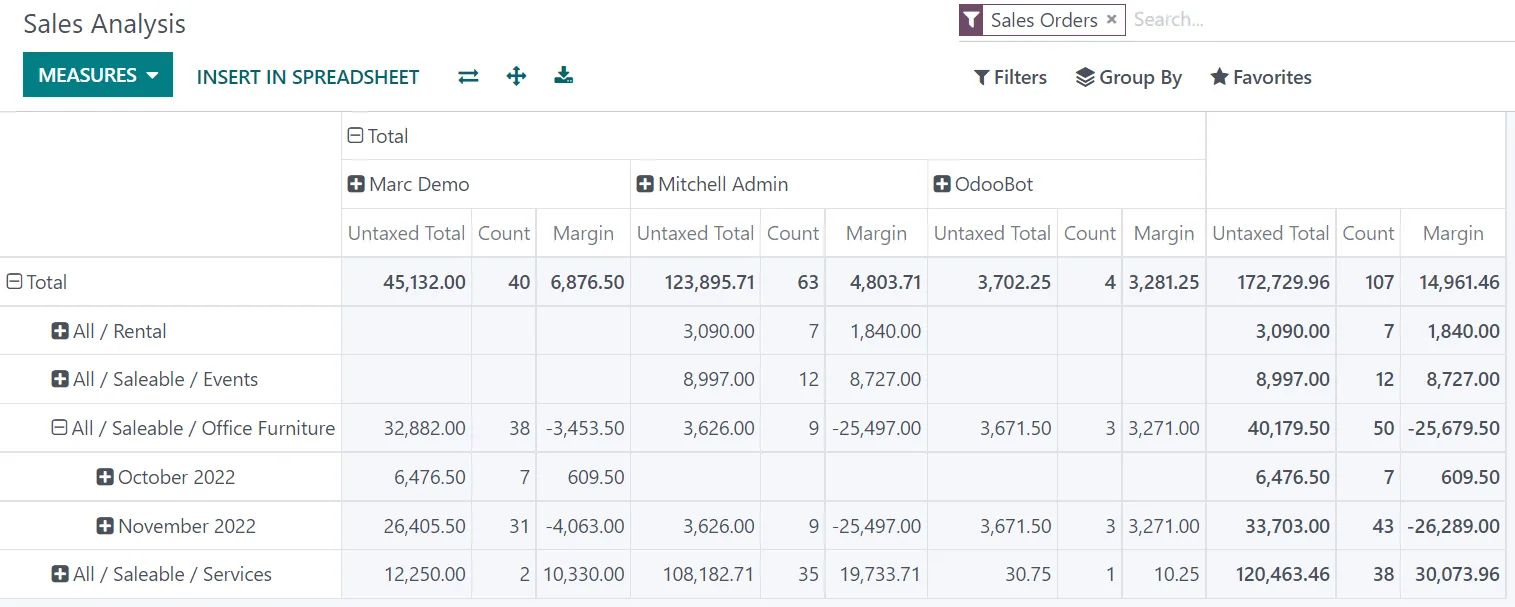
Sales reporting in Odoo is built on confirmed orders, so the numbers match what finance will invoice.
These are the steps a typical B2B order takes, with each record linked to the next.
One shared database: every step updates stock, finance and reports in real time.
We switch on only the features your team will use, so the quotation screen stays simple.
Reusable quote layouts with standard lines, validity, terms and optional products the customer can add.
Rules for wholesale, retail, project and export customers, in AED or foreign currency, with date ranges for promotions.
Line discounts limited by user rights, so larger reductions need a manager to edit or approve the quote.
A credit limit per customer that warns sales staff when a new order would exceed the open balance.
Customers accept quotes in the portal with a signature and pay by card through a supported payment provider.
Invoice on ordered quantities for services and subscriptions, or on delivered quantities for goods.
Advance invoices as a fixed amount or percentage, deducted automatically from the final invoice.
Sizes, finishes and packaging units such as cartons or pallets, with conversion to the base unit.
Sales orders feed most other parts of Odoo. These are the connections we configure most often.
Odoo supports these through tax, document and sequence settings. Confirm specific treatments with your tax advisor.
UAE VAT at 5% applies to most local sales. Invoices generated from sales orders show your TRN, customer TRN where applicable, VAT per line and the other prescribed fields, using the UAE localization tax setup.
Exports outside the GCC and certain designated zone supplies may be zero-rated or outside scope depending on the facts. Fiscal positions apply the right tax to a customer automatically once your advisor confirms the treatment.
Ministerial Decisions No. 243 and 244 of 2025 introduce Peppol-based e-invoicing through Accredited Service Providers using PINT AE. Large businesses (revenue of AED 50 million or more) are mandated from 1 January 2027 and others from 1 July 2027. Clean customer master data in Sales now makes that switch easier. Check the latest Ministry of Finance and FTA guidance.
Down payments can create a VAT point under the time of supply rules. Odoo issues down payment invoices with VAT, but confirm how your advance receipts should be treated with your advisor.
General information, not tax or legal advice. Rules change; confirm current FTA, MOHRE and Ministry of Finance guidance with your advisor.
Most sales app problems come from master data and unclear pricing rules, not from the software.
Pages that cover the apps around Odoo Sales and the businesses that use it.
We configure the system for the rules UAE businesses report against, and test it before go-live.
General information, not tax or legal advice. Confirm current requirements with the FTA, MOHRE or your advisor. See all UAE compliance guides.
On-site workshops in Dubai, Abu Dhabi and Sharjah, and remote or on-site delivery across the Northern Emirates and free zones.
Official sources and references
Facts on this page were checked against these sources in October 2026. Rules change, so confirm current requirements before acting.
Still have a question? Our consultants are happy to help.
Ask an ExpertCRM manages leads and opportunities before a customer is ready for a price. Sales manages quotations, orders and invoicing once they are. Most UAE clients use both, with a button on the opportunity that creates the quotation.
You can quote and invoice in foreign currencies using pricelists in that currency, while Odoo posts the accounting entries in AED at the rate of the day. If you prefer AED invoices for USD-priced goods, we set up pricelists or rules that convert prices consistently.
The standard credit limit feature warns users when an order would push a customer over the limit. If you need a hard block or an approval step, we add that with a small customization or an approval rule.
Yes. With online signature enabled, customers open the quote from an email link, review it in the portal and sign to confirm. The signed PDF is stored on the order for your records.
Odoo supports Arabic as a language and the UAE localization includes invoice layouts suited to local requirements. Quotation and order templates can be adjusted to show both languages where your customers or tenders need it.
Odoo records the salesperson and team on every order, so commission reports can be built from confirmed or paid orders. Recent Enterprise versions add commission plans; on older versions we use reports or light customization to calculate them.
Tell us how your business runs today and where it gets stuck. We'll recommend the right platform, outline the implementation approach and give you a realistic timeline, with no obligation.
Dubai, United Arab Emirates