L
O
A
D
I
N
G


Zoho, Odoo, ERPNext, Dynamics 365 and custom ERP, delivered by one accountable team.

Plan technician routes across the emirates, track parts in vans, and close work orders on a mobile app with photos and customer signatures.
Dynamics 365 Field Service suits UAE MEP, facility management, HVAC, lift maintenance and installation companies that dispatch technicians across emirates. It turns customer requests or preventive maintenance schedules into work orders, helps dispatchers assign technicians by skill, location and availability on a schedule board, and gives technicians an offline-capable mobile app for time, parts, photos and signatures.
Dynamics 365 Field Service UAE projects are common among MEP contractors, facility management companies, HVAC and elevator maintenance firms, medical equipment suppliers and security system installers. These businesses send technicians to sites from Jebel Ali to Musaffah every day, and the dispatcher's whiteboard stops working once the team grows beyond a few vans.
Dynamics 365 Field Service is Microsoft's application for that work. It turns a customer request or a preventive maintenance schedule into a work order, helps dispatchers assign the right technician by skill, location and availability, and gives technicians a mobile app to record time, parts, photos and signatures on site.
Planning in the UAE has its own constraints: traffic between emirates, site access permits, summer midday work restrictions for outdoor jobs, and annual maintenance contracts (AMCs) with fixed visit counts. We configure Field Service so schedules, agreements and reports reflect these realities.
Because Field Service runs alongside Dynamics 365 Customer Service and connects to Business Central or Finance, a breakdown call, the technician visit and the final invoice stay linked in one history.
We help you decide how far to go in the first phase. Some companies start with reactive work orders and the mobile app only, then add AMC agreements, van inventory and scheduling optimization once technicians are comfortable. Others with large preventive maintenance portfolios start with agreements and customer assets, because that is where missed visits cost them the most.

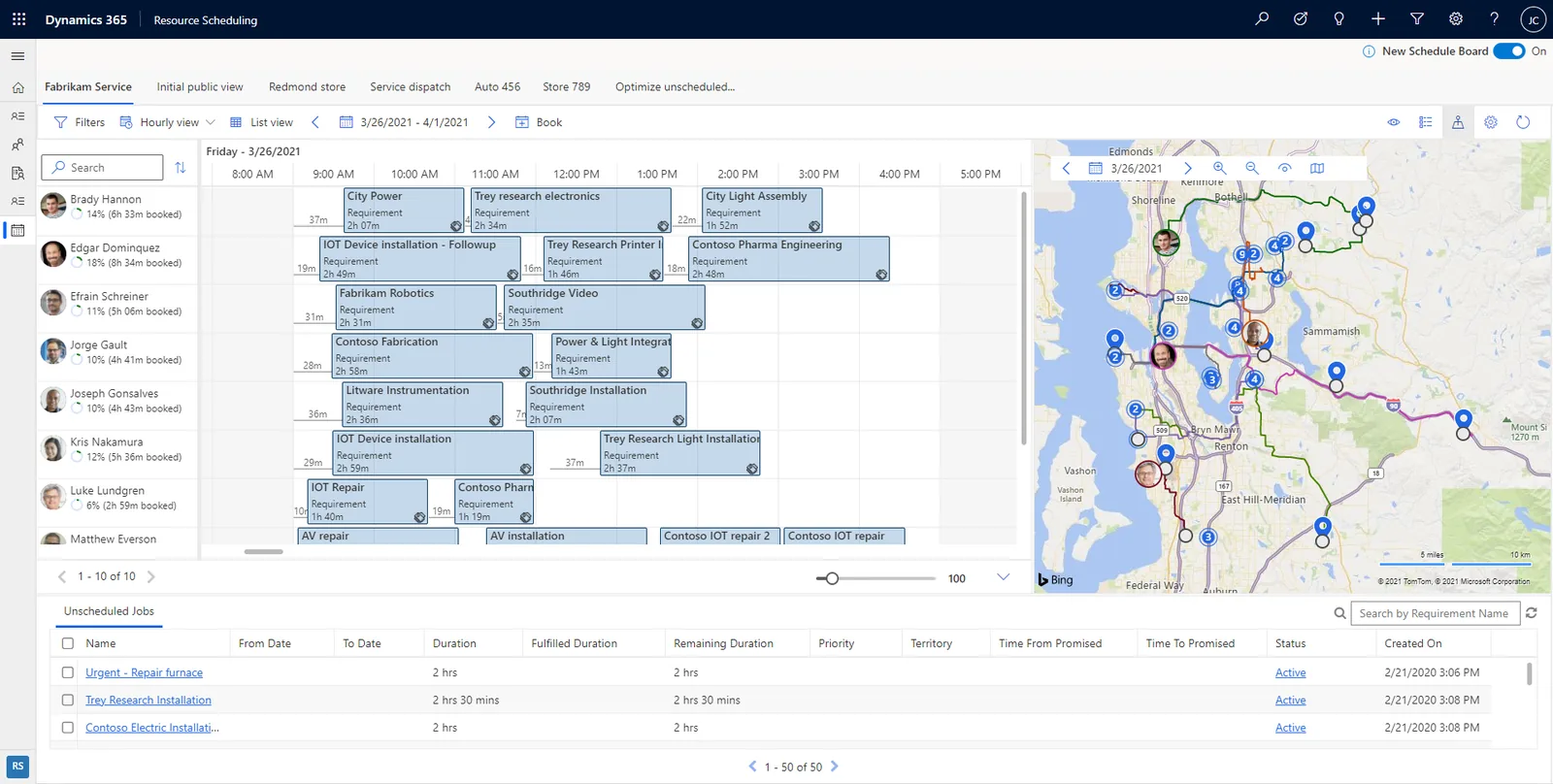
Dispatchers work from the schedule board; managers track completion and first-time fix rates.
A typical reactive maintenance flow for a UAE facility services company.
One shared database: every step updates stock, finance and reports in real time.
These features cover most UAE maintenance and installation operations.
Standard job templates with tasks, estimated duration, required skills and typical parts, so each new job starts with the right checklist.
Drag-and-drop dispatching with map view, filtered by territory, skill and availability. Optional optimization can propose schedules automatically.
Technicians see bookings, navigate to site, complete inspections, capture photos and signatures, and keep working offline in basements and plant rooms.
AMC and service contracts generate preventive maintenance work orders and invoices on a schedule, such as quarterly chiller servicing.
Each installed unit, such as an AHU, lift or generator, has its own service history, warranty and location on site.
Van and warehouse stock, parts transfers, returns and purchase orders linked to work orders.
Digital forms for safety checks and handover reports, with responses stored against the asset.
Teams calls and connected device alerts can trigger or support work orders, depending on licensing and setup.
Field data must reach finance and customer teams to be useful.
Several local requirements shape how jobs are scheduled and billed. Confirm specific obligations with your advisors.
MOHRE's summer midday break limits outdoor work during set hours in the summer months. Working hours and booking rules can block outdoor jobs in that window.
Invoices for AMC and ad hoc visits are raised in the ERP with the 5% VAT, TRN and prescribed fields, so field data must carry the right customer and contract.
Service invoices will fall under UAE e-invoicing through Accredited Service Providers on the phased dates from 2027. Check the latest Ministry of Finance and FTA guidance.
Time entries from the mobile app can feed payroll so overtime under UAE Labour Law is calculated from real records rather than paper timesheets.
General information, not tax or legal advice. Rules change; confirm current FTA, MOHRE and Ministry of Finance guidance with your advisor.
What we learned from rolling out field apps to UAE technicians.
Sister apps, software categories and industry pages.
We configure the system for the rules UAE businesses report against, and test it before go-live.
General information, not tax or legal advice. Confirm current requirements with the FTA, MOHRE or your advisor. See all UAE compliance guides.
On-site workshops in Dubai, Abu Dhabi and Sharjah, and remote or on-site delivery across the Northern Emirates and free zones.
Official sources and references
Facts on this page were checked against these sources in October 2026. Rules change, so confirm current requirements before acting.
Still have a question? Our consultants are happy to help.
Ask an ExpertNo. Field Service can be used on its own, with work orders created directly or from agreements. Many companies add Customer Service when they want a contact centre logging requests first.
Yes. The mobile app supports offline mode, syncing bookings, work orders and forms when the device reconnects.
Agreements generate scheduled work orders and invoices on the frequency you set. We model each contract type with your operations team.
The schedule board supports manual and assisted scheduling. Automatic optimization across many technicians is available with additional configuration and licensing.
Yes. Customer assets carry warranty dates, and work orders can be flagged as warranty, AMC or chargeable. Billing rules then decide which visits create an invoice and which are covered by the contract.
Completed work orders with time and parts can create invoices through integration with Business Central or Dynamics 365 Finance, where VAT is applied.
Related Solutions
Related Industries
Related ERP Platforms
Tell us how many technicians, territories and contracts you manage, and we will outline a Dynamics 365 Field Service setup.
Dubai, United Arab Emirates