L
O
A
D
I
N
G


Zoho, Odoo, ERPNext, Dynamics 365 and custom ERP, delivered by one accountable team.

We implement Odoo Field Service so technicians get clear jobs on their phones, record work and parts on site, and finance can invoice before the van is back.
Odoo Field Service is an Odoo Enterprise app for companies whose technicians visit customer sites, such as air-conditioning, pest control, elevator and CCTV firms in the UAE. Each job is a task with address, time slot and technician. Technicians complete mobile worksheets with photos and signatures, add parts from van stock, and finance invoices labour and parts from the completed task.
Odoo Field Service UAE users are companies whose revenue depends on people visiting customer sites: air-conditioning installers, pest control operators, elevator and generator service firms, CCTV and IT hardware installers, and appliance repair teams. The daily pattern is similar. A call comes in, someone finds a free technician, the technician fills a paper sheet, and the office types it up days later. Parts taken from the van rarely reach the stock records, and some jobs are never invoiced at all.
Odoo Field Service is an Enterprise app built on the same task engine as Odoo Project, but designed for one-visit jobs. Each intervention is a task with a customer, site address, planned date and assigned technician. On a phone the technician sees today's jobs, opens directions, starts a timer, fills a worksheet, adds the products used from a catalog and collects the customer's signature. Marking the task done can create the invoice through the linked sales order.
What makes it different from a standalone field app is that everything stays in one database: the ticket that triggered the visit in Odoo Helpdesk, the spare parts in Odoo Inventory, and the invoice in Odoo Accounting. Companies that also manage planned maintenance on their own equipment should compare it with Odoo Maintenance, which focuses on internal assets rather than customer visits.

The products we configure, integrate and support on projects like this one.
 Odoo Invoicing / Accounting
 Odoo Sales
 Odoo CRM
 Odoo Inventory
 Odoo Purchase
 Odoo Manufacturing
Product names and logos are trademarks of their respective owners and are shown only to identify the software we implement.
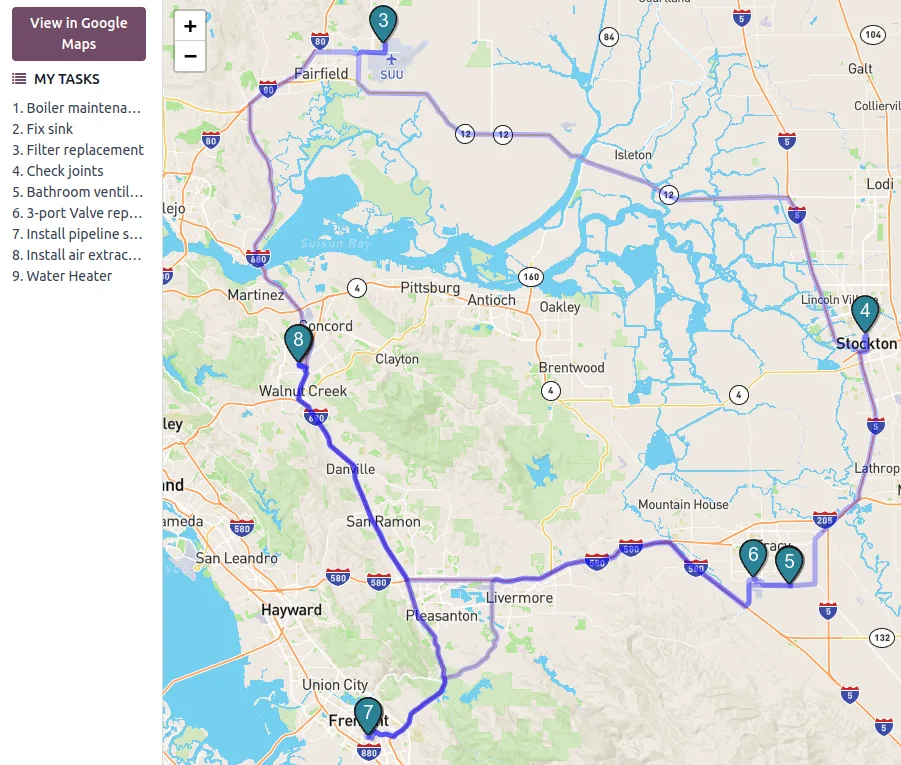
Coordinators in the UAE juggle traffic, access permits and customer time windows. The planning view keeps that manageable.
Most of our UAE clients follow this sequence, whether the job comes from a call, a ticket or a sales order.
One shared database: every step updates stock, finance and reports in real time.
We set up these features around your job types, not a generic template.
Jobs with customer, site, planned time and technician, created by hand, from a ticket or from a service product on a sales order.
Job-specific forms built with Odoo Studio, such as AC commissioning readings, pest treatment records or CCTV handover checklists.
Today's jobs, navigation to site, timer, notes, photos and signature capture from the Odoo mobile app.
Technicians add parts and consumables used, which updates stock and adds billable lines to the job.
Drag tasks between technicians and days, with skills and time off visible before you assign.
Jobs plotted on a map so coordinators can group visits by area, for example Al Quoz in the morning and JLT after lunch.
Time spent and products used turn into invoice lines, at a fixed price per visit or based on time and materials.
Repeat tasks for service contracts, such as quarterly AC servicing or monthly pest control, generated on a schedule.
Field work starts in customer service and ends in finance. These links make that a single flow.
Odoo supports these through configuration. Confirm tax and labor questions with your advisors.
Invoices created from field tasks apply UAE VAT at 5% to labor and parts, with your TRN and the prescribed invoice fields. Contract billing in advance should follow your advisor's view on time of supply.
MOHRE's seasonal midday break restricts outdoor work in set afternoon hours during the summer months. Coordinators can block those slots for outdoor job types in the planning view.
Signed worksheets with timestamps and photos give building owners and facility managers a clear record of work done, which helps when they face inspections or insurance questions.
Service invoices will move to structured e-invoicing through Accredited Service Providers using PINT AE: from 1 January 2027 for businesses with revenue of AED 50 million or more and 1 July 2027 for others. Check the latest Ministry of Finance and FTA guidance.
General information, not tax or legal advice. Rules change; confirm current FTA, MOHRE and Ministry of Finance guidance with your advisor.
Field rollouts succeed or fail with the technicians, so most of these tips are about them.
More on service operations, maintenance and helpdesk in Odoo and beyond.
We configure the system for the rules UAE businesses report against, and test it before go-live.
General information, not tax or legal advice. Confirm current requirements with the FTA, MOHRE or your advisor. See all UAE compliance guides.
On-site workshops in Dubai, Abu Dhabi and Sharjah, and remote or on-site delivery across the Northern Emirates and free zones.
Official sources and references
Facts on this page were checked against these sources in October 2026. Rules change, so confirm current requirements before acting.
Still have a question? Our consultants are happy to help.
Ask an ExpertNo. Field Service is an Enterprise app, along with Studio, which we use to build worksheets. Community users can manage simple on-site jobs with Project tasks, but lose the mobile worksheet, product catalog and invoicing flow.
The Odoo mobile experience works best with a connection. Basements, plant rooms and remote sites can have weak signal, so we plan for technicians to sync before and after visits and keep worksheets short.
Field Service handles jobs at customer sites that you bill for. Maintenance handles preventive and corrective work on your own equipment, such as production machines or company vehicles, without customer invoicing.
Yes. With Helpdesk and Field Service both installed, an agent can plan an intervention from the ticket. The field task stays linked, so the customer service team sees when the technician has finished.
Recurring tasks and subscription products cover most contract patterns, such as a set number of visits per year. Contracts with complex coverage rules may need light customization, which we scope early.
A focused rollout for one service line, with worksheets, van stock and invoicing, often takes several weeks including a pilot. Adding Helpdesk, contracts and multiple branches extends the timeline.
Related Solutions
Related Industries
Related ERP Platforms
Talk to our Odoo team in Dubai about worksheets, technician scheduling and same-day invoicing for your field service operation.
Dubai, United Arab Emirates