L
O
A
D
I
N
G


Zoho, Odoo, ERPNext, Dynamics 365 and custom ERP, delivered by one accountable team.

We configure the Odoo Purchase app so every dirham of spend starts with an approved order, arrives against a receipt and is paid only when the bill matches.
Odoo Purchase controls procurement in the UAE through one document chain: a request for quotation sent to several vendors, a confirmed purchase order with amount-based approval, a receipt in Odoo Inventory, and a vendor bill matched to what was ordered and received. Landed costs such as freight, customs duty and clearing charges for goods imported through Jebel Ali can be added to stock value.
Odoo Purchase UAE projects usually start with a familiar complaint from the finance team: supplier bills arrive for goods nobody remembers ordering, at prices nobody agreed. Purchase requests live in WhatsApp chats, quotations sit in personal inboxes, and the storekeeper signs delivery notes without checking them against anything. For a trading house in Deira or a contractor buying materials for three sites at once, that gap between ordering and paying is where margin disappears.
The Odoo Purchase app closes it with one document chain. A buyer raises a request for quotation (RFQ), sends it to one or more vendors from Odoo, records their prices, and confirms the winning RFQ as a purchase order. The warehouse receives against that order in Odoo Inventory, and the vendor bill is created from the order in Odoo Accounting, so quantities and prices can be compared line by line before payment.
For UAE businesses the setup has a few local points. Many buy in USD, EUR or CNY while reporting in AED, so vendor pricelists and multi-currency rates matter. Importers need landed costs for freight, customs duty and clearing charges spread onto product cost. Vendor bills must carry the right VAT treatment, including reverse charge on imported services and goods where it applies. We build these into the Purchase configuration as part of our Odoo implementation work, and connect it to Odoo Inventory so stock and spend stay in step.

The products we configure, integrate and support on projects like this one.
 Odoo Purchase
 Odoo Invoicing / Accounting
 Odoo Sales
 Odoo CRM
 Odoo Inventory
 Odoo Manufacturing
Product names and logos are trademarks of their respective owners and are shown only to identify the software we implement.
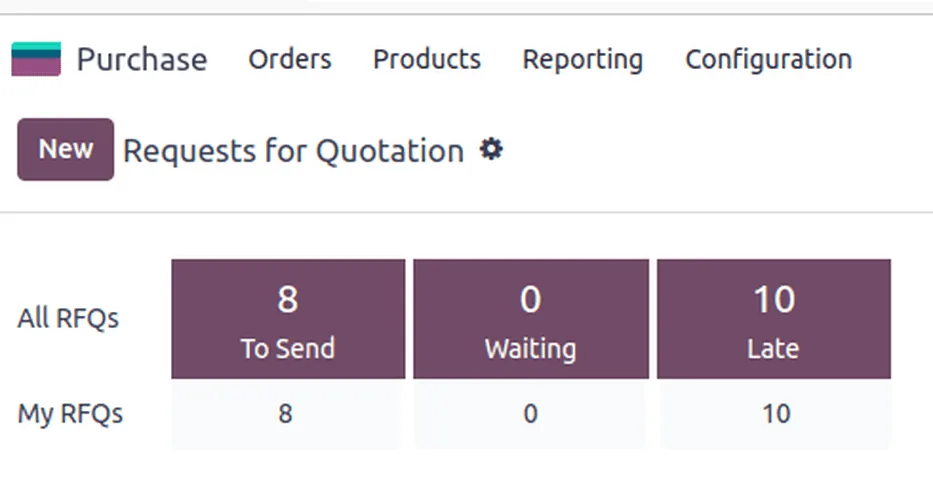
The Purchase dashboard turns open orders into a short to-do list for buyers and approvers.
Each step creates a record linked to the one before it, which gives auditors and managers a single trail per purchase.
One shared database: every step updates stock, finance and reports in real time.
Odoo Purchase is a small app on the surface. Most of its value comes from settings that buyers never see but rely on daily.
Send the same requirement to several suppliers, then compare prices and lead times before confirming one order.
A two-step approval rule above an amount you set, so buyers can work freely on small orders while large ones wait for a manager.
Purchase agreements with agreed prices for a period, useful for annual cement, steel or packaging contracts called off in batches.
Supplier prices by quantity, currency and validity date, picked up automatically when an RFQ is created.
Minimum and maximum stock levels that generate draft RFQs when stock falls, grouped by preferred vendor.
Bills based on ordered or received quantities, with differences flagged so accounts payable does not overpay.
Freight, insurance, customs duty and clearing fees allocated to received products by value, weight, volume or quantity.
Reports on spend, vendor on-time delivery and price trends, filterable by buyer, category and company.
Purchasing touches stock, finance and suppliers. These are the links we most often set up for UAE clients.
Odoo supports these rules through tax and fiscal position configuration. Confirm the treatment of your own transactions with your tax advisor.
UAE VAT is 5%, administered by the Federal Tax Authority. Bills from registered suppliers should show the supplier TRN, and Odoo records recoverable input VAT on its own tax account so it flows to the VAT return you file through EmaraTax.
Imported goods and services from abroad can fall under the reverse charge mechanism. We configure fiscal positions for foreign vendors so Odoo posts both output and input VAT where your advisor confirms it applies.
Under Ministerial Decisions No. 243 and 244 of 2025, structured e-invoices will be exchanged through Accredited Service Providers using the PINT AE specification. Businesses with revenue of AED 50 million or more go live from 1 January 2027, others from 1 July 2027. Vendor bills will increasingly arrive as data, not PDFs. Check the latest Ministry of Finance and FTA guidance, as dates have changed before.
Corporate tax at 9% above AED 375,000 of taxable income makes expense classification important. Linking purchases to analytic accounts and expense categories keeps the support for deductions in one place.
General information, not tax or legal advice. Rules change; confirm current FTA, MOHRE and Ministry of Finance guidance with your advisor.
These are the decisions that most affect whether buyers adopt the app or go back to email.
Explore the apps and services that sit around Odoo Purchase.
We configure the system for the rules UAE businesses report against, and test it before go-live.
General information, not tax or legal advice. Confirm current requirements with the FTA, MOHRE or your advisor. See all UAE compliance guides.
On-site workshops in Dubai, Abu Dhabi and Sharjah, and remote or on-site delivery across the Northern Emirates and free zones.
Official sources and references
Facts on this page were checked against these sources in October 2026. Rules change, so confirm current requirements before acting.
Still have a question? Our consultants are happy to help.
Ask an ExpertYes, in two common ways. Staff can raise a request in the Odoo Approvals app that turns into an RFQ once approved, or buyers can create RFQs directly from replenishment suggestions. We pick the route that fits how many people request goods.
The Purchase settings include an order approval option with a minimum amount, so orders above it need a manager to approve. More layered rules, such as different limits per department or project, are usually built with Odoo Approvals or light customization.
You record freight, insurance, customs duty and clearing charges as landed cost lines and link them to the receipt. Odoo spreads them across the received products using the split method you choose, which updates stock valuation and product margins.
Core purchasing, RFQs and vendor bills are in Community. Some features we use often, such as certain approval and document digitization tools, need Odoo Enterprise. We confirm which edition covers your process during scoping.
Odoo can send purchase orders through the vendor portal, where suppliers can view and acknowledge them and update expected delivery dates. Adoption depends on your suppliers, so most UAE clients run email and portal side by side.
When Inventory and Accounting are already live, adding Purchase is often a few weeks of configuration, data loading and training. As part of a full ERP project it follows the main timeline, typically a few months for a focused rollout.
Related Solutions
Related Industries
Related ERP Platforms
Talk to our Odoo consultants in Dubai about approval limits, landed costs and vendor bill matching for your purchasing team.
Dubai, United Arab Emirates