L
O
A
D
I
N
G


Zoho, Odoo, ERPNext, Dynamics 365 and custom ERP, delivered by one accountable team.

We set up the standard reports properly, build the custom ones your managers ask for, and schedule them so they arrive without anyone exporting to Excel.
ERP reporting solutions in the UAE work in three layers: standard platform reports configured correctly, custom reports built for your entities, branches and cost centres, and scheduled reports emailed automatically as PDF or Excel. Often the first fix is the chart of accounts, analytic tags or warehouse structure. Zoho, Odoo, ERPNext and Business Central support custom reports without editing core code.
Our ERP Reporting Solutions UAE service turns the data already in your ERP into reports that finance, sales, purchasing and warehouse teams read every week. We work in three layers: standard reports that ship with the platform, custom reports built for your structure, and scheduled reports that are generated and emailed automatically.
Most companies use only a fraction of the reports their system already offers, mainly because the chart of accounts, analytic tags or warehouse setup do not support the views managers want. Fixing that structure is often the first and cheapest step, before any custom development.
This page is about tabular, printable and exportable reports such as the trial balance, aged receivables, stock valuation and sales by salesperson. Visual role-based screens are covered on our ERP dashboard solutions page, and cross-system analytics on ERP business intelligence.
Typical requests we handle include a monthly profit and loss by branch for owners, a weekly collections report for the credit controller, a daily stock exception list for the warehouse, purchase price variance for procurement, and a corporate tax working schedule for the accountant to review. Each one is built so it can be rerun for any period without manual edits.

The pattern is familiar: the data is in the system, but getting a clean report out of it takes a person and a spreadsheet.
Finance exports the general ledger and rebuilds the management pack by hand. Each version differs slightly, and errors creep in.
Revenue and costs are not tagged by branch, project or cost center. Managers cannot see profit for their own unit.
The VAT summary does not tie to the ledger because some transactions use the wrong tax code. The return is corrected outside the system.
Inventory valuation differs from the balance sheet, often because of unposted receipts or landed cost entries.
Useful reports exist but someone has to remember to run them. When that person is on leave, the report simply stops.
We start with the decisions people make, then work back to the data.
We list the reports each team uses today, including spreadsheets, and note who reads them, how often and what decision they support.
We review the chart of accounts, analytic accounts, cost centers, dimensions and item categories so standard reports can slice data the way you need.
Trial balance, profit and loss, balance sheet, aged receivables and payables, VAT summary, stock ledger and sales analysis are set up and checked against your figures.
Where standard reports fall short, we build custom ones using the platform's report builder, SQL-based reports where supported, or custom print formats.
Reports are scheduled to run daily, weekly or at month-end and emailed to named recipients, with access rights respected.
Each report comes with a short definition so readers know what it includes.
Timing depends on how much structural clean-up is needed before reports are reliable.
Durations are typical ranges; your plan is agreed after discovery.
Interviews with finance and department heads, plus review of existing spreadsheets.
Chart of accounts, analytic tags and dimensions adjusted where needed.
Configure and reconcile core financial and operational reports.
Build and test custom reports in priority order.
Set up schedules, recipients and a short training session.
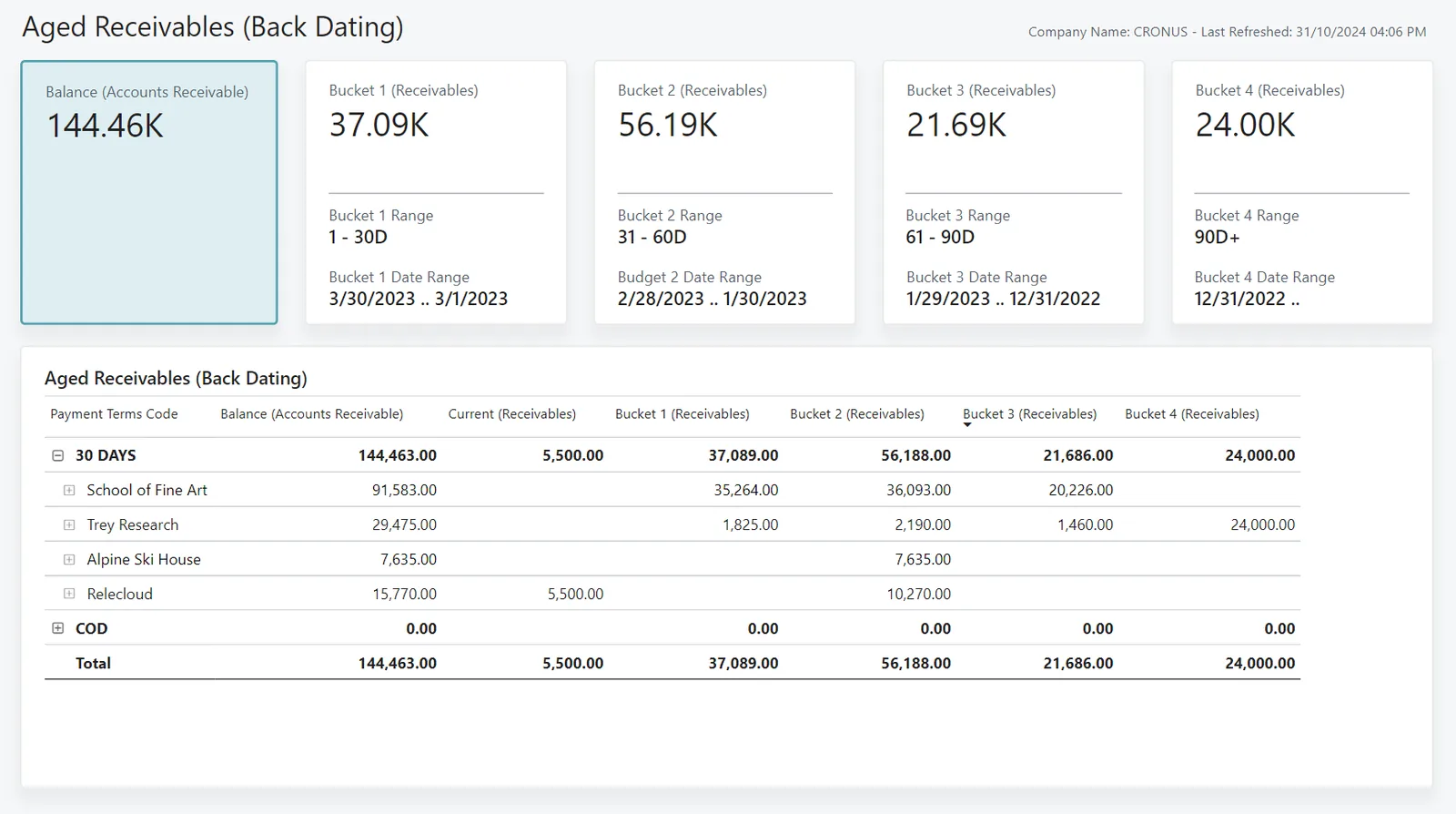
Reports feed a finance view so the controller can check readiness before sending the pack.
These are the improvements companies typically target. We do not promise specific numbers.
Management reports come straight from the ERP, so less time goes on rebuilding them in Excel.
Every manager reads the same report from the same data, which ends arguments over whose figure is right.
Branch, project and cost center reports let each manager see their own results.
Scheduled delivery removes the dependency on one person remembering to run them.
Further reading on reporting, finance and analytics.
We configure the system for the rules UAE businesses report against, and test it before go-live.
General information, not tax or legal advice. Confirm current requirements with the FTA, MOHRE or your advisor. See all UAE compliance guides.
On-site workshops in Dubai, Abu Dhabi and Sharjah, and remote or on-site delivery across the Northern Emirates and free zones.
Official sources and references
Facts on this page were checked against these sources in October 2026. Rules change, so confirm current requirements before acting.
Yes. Zoho, Odoo, ERPNext and Business Central all allow custom reports through report builders, custom views or add-on reports without editing core code. That keeps upgrades simpler.
Most platforms support Arabic print layouts and bilingual headers. We set up Arabic or bilingual formats where your recipients or authorities need them.
No. We configure the VAT reports so they reconcile to your ledger. Filing and tax interpretation stay with your accountant or tax advisor, who should confirm the setup.
Yes, scheduled reports can be generated and emailed as PDF or Excel on a fixed schedule. The method differs by platform, from built-in scheduling to automated jobs.
If you need to combine ERP data with CRM, e-commerce, HR or spreadsheets, or analyze long histories across systems, a BI layer is usually better. Single-system operational and financial reports are best kept in the ERP.
Yes, where the companies share one ERP database, reports can be run per company or combined, with intercompany balances shown separately. Companies on separate systems usually need a BI layer for combined reporting.
Related Solutions
Related Industries
Related ERP Platforms
Send us the three reports you rebuild most often in Excel and we will show how to produce them from your ERP.
Dubai, United Arab Emirates