L
O
A
D
I
N
G


Zoho, Odoo, ERPNext, Dynamics 365 and custom ERP, delivered by one accountable team.

For consultancies, engineering offices, audit and advisory firms, we connect proposals, staffing, timesheets and billing in Dynamics 365 so partners can see which engagements earn their keep.
UAE professional services firms usually choose between Dynamics 365 Project Operations, for larger consultancies with resource managers and complex contract billing, and Business Central's Projects module for smaller practices wanting projects and accounting together. Both connect proposals, staffing, timesheets and billing, support time and materials, fixed fee, milestone and retainer billing, and show utilisation and unbilled WIP to partners.
Dynamics 365 for professional services in the UAE is mostly about people's time. A management consultancy in DIFC, an engineering design office in Abu Dhabi or an audit firm in Business Bay sells hours, expertise and deliverables, so the questions are always the same: who is working on what, how much of that work is billable, and has it been invoiced and collected. If those answers come from separate timesheet, CRM and accounting tools, partners only get them at month-end.
Microsoft offers two fits. Dynamics 365 Project Operations brings together quotes, project contracts, resource scheduling, time and expense entry and billing, and connects to Finance for larger firms. Business Central's Projects module, with resources, timesheets and project billing, covers smaller practices that want one system for projects and accounting. Both work naturally with Outlook, Teams and Excel, which most service firms already use every day.
We help firms decide which one to use based on headcount, billing models and the number of legal entities. If you are a small firm weighing cheaper options, it is worth reading Zoho for professional services too. We implement both and will tell you if Dynamics 365 is more than you need.

These patterns appear whether the firm has 15 consultants or 300.
Consultants fill in a week of time on Friday afternoon, from memory. Hours go missing, and invoices go out lower than the work delivered.
Fixed-fee engagements are priced at proposal stage but nobody compares hours spent with hours budgeted until the job is closed. Write-offs are discovered too late to act on.
Milestones are reached but invoices wait for a partner's review. Unbilled WIP builds up and cash flow suffers, especially with clients on long payment cycles.
Leaders sense that some teams are stretched and others are idle, but there is no report to confirm it. Hiring and staffing decisions are made on feel.
Travel, visa, translation and attestation costs incurred for clients are sometimes re-billed and sometimes forgotten. Receipts arrive weeks after the trip.
This is the path an engagement follows in Project Operations or Business Central. Each step updates the same project record.
One shared database: every step updates stock, finance and reports in real time.
Project Operations covers the full lifecycle. Business Central handles most of the same steps in a simpler form for smaller practices.
Proposals built from role-based estimates turn into contracts with billing rules, so pricing assumptions follow the engagement.
Project Operations matches bookings to people by role, skill and availability, with a schedule board for resource managers.
Weekly timesheets from the web client or mobile, with copy-forward and approval routing to the engagement lead.
Receipts photographed on a phone, coded to the client project and marked as billable or non-billable.
Time and materials, fixed price with milestones, and retainers. Invoice proposals let partners review lines before posting.
Cost, revenue, unbilled WIP and recognized revenue per project, posted to the general ledger with project dimensions.
Project records, documents and approvals can be reached from Outlook and Teams, where consultants already spend their day.
Utilization, realization, backlog and margin reports by practice, partner and client, refreshed from Dynamics 365 data.
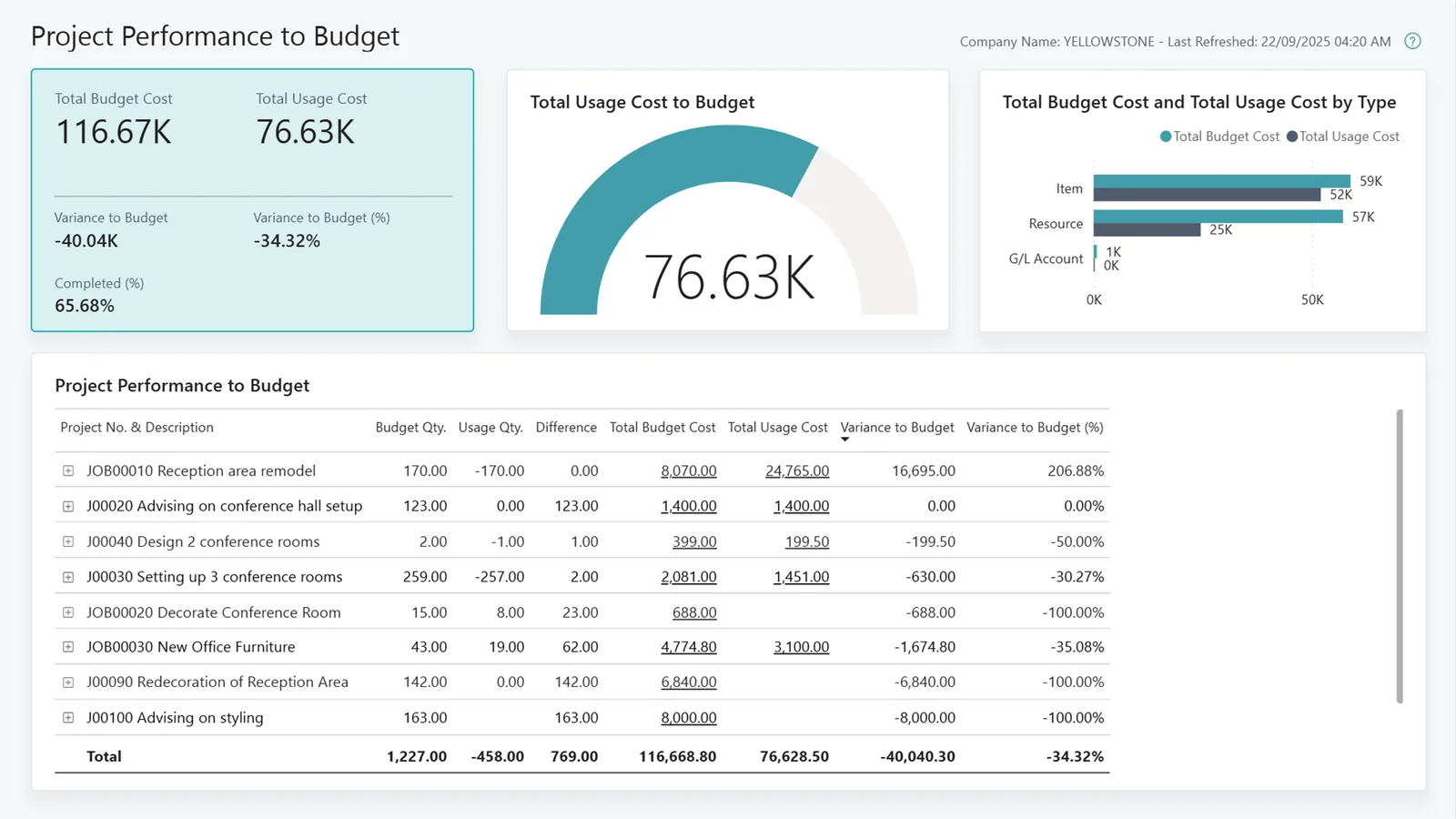
We build separate views for partners, resource managers and finance, all fed by the same approved timesheets.
Service firms are often in free zones and bill clients across borders, which raises specific questions. Confirm tax treatment with your tax advisor.
Services to clients outside the UAE may be zero-rated if conditions are met, while local clients are charged 5%. We configure VAT posting groups by client location so the agreed treatment is applied on each invoice.
Firms in DMCC, DIFC, ADGM and other free zones may ask whether they can be Qualifying Free Zone Persons. That depends on qualifying activities, substance and de minimis rules, so we keep revenue tagged by client type and location to support the analysis your advisor does.
Smaller practices with revenue up to AED 3 million may elect Small Business Relief for tax periods ending on or before 31 December 2026. Clean revenue records help support that election.
Most professional services invoices are B2B, so the PINT AE move through an Accredited Service Provider applies from January 2027 for revenue of AED 50 million or more and July 2027 for others. Check the latest Ministry of Finance and FTA guidance.
General information, not tax or legal advice. Rules change; confirm current FTA, MOHRE and Ministry of Finance guidance with your advisor.
For a firm of 30 to 150 people, a first phase often runs 10 to 16 weeks, with Power BI reporting added in a later phase.
Durations are typical ranges; your plan is agreed after discovery.
We list every billing arrangement in use, from hourly to retainer, and decide how each will be configured.
We confirm Project Operations or Business Central, and design roles, rates, approvals and the project structure.
Rates, project templates, timesheet rules and invoice layouts are set up. Open engagements and WIP balances are prepared for loading.
One practice runs timesheets and billing in the new system for a full cycle before the rest of the firm joins.
Remaining teams move over, with short training sessions per role and a timesheet compliance report for leaders.
Explore sector pages and Dynamics 365 services for service firms.
We configure the system for the rules UAE businesses report against, and test it before go-live.
General information, not tax or legal advice. Confirm current requirements with the FTA, MOHRE or your advisor. See all UAE compliance guides.
On-site workshops in Dubai, Abu Dhabi and Sharjah, and remote or on-site delivery across the Northern Emirates and free zones.
Official sources and references
Facts on this page were checked against these sources in October 2026. Rules change, so confirm current requirements before acting.
Still have a question? Our consultants are happy to help.
Ask an ExpertProject Operations suits firms with resource managers, many concurrent engagements and complex contract billing. Business Central works well for smaller firms that want projects and accounting in one product. Headcount, billing variety and the number of legal entities usually decide it.
Yes. Time entry is available in the web client and on mobile, and records can be reached from Microsoft Teams. We also set reminders and a missing-timesheet report so hours are captured weekly.
A retainer can be set up as a recurring fixed amount, with hours tracked against it for utilization and overrun reporting. Work outside the retainer scope can be billed separately on time and materials.
Yes. Dynamics 365 supports multiple currencies on contracts and invoices, with exchange rates updated regularly and realized gains or losses posted when payments arrive in AED.
No. Partners mostly need to approve time, review invoice proposals and read a few dashboards. We give them short, role-specific training and keep the detailed screens for finance and resource managers.
Related Solutions
Related Industries
Related ERP Platforms
Tell us your billing models and team size, and we will outline the right Dynamics 365 setup for your firm.
Dubai, United Arab Emirates