L
O
A
D
I
N
G


Zoho, Odoo, ERPNext, Dynamics 365 and custom ERP, delivered by one accountable team.

We move UAE companies from QuickBooks Online or Desktop into Odoo, rebuilding classes, items and banking so sales, purchasing and stock post to accounting automatically.
To migrate from QuickBooks to Odoo in the UAE, design the Odoo setup first, export data from QuickBooks Online or Desktop, load it into a staging database, reconcile it against QuickBooks and then cut over. Classes and locations become Odoo analytic plans, products get proper type, costing and stock accounts, and each old VAT code is mapped to Odoo's UAE localisation.
A QuickBooks to Odoo migration in the UAE replaces a bookkeeping tool with an operating system for the business. In QuickBooks, someone creates an invoice and records a payment. In Odoo, a CRM opportunity becomes a quotation, the confirmed order reserves stock, the warehouse validates the delivery, and the invoice is generated from what was actually shipped.
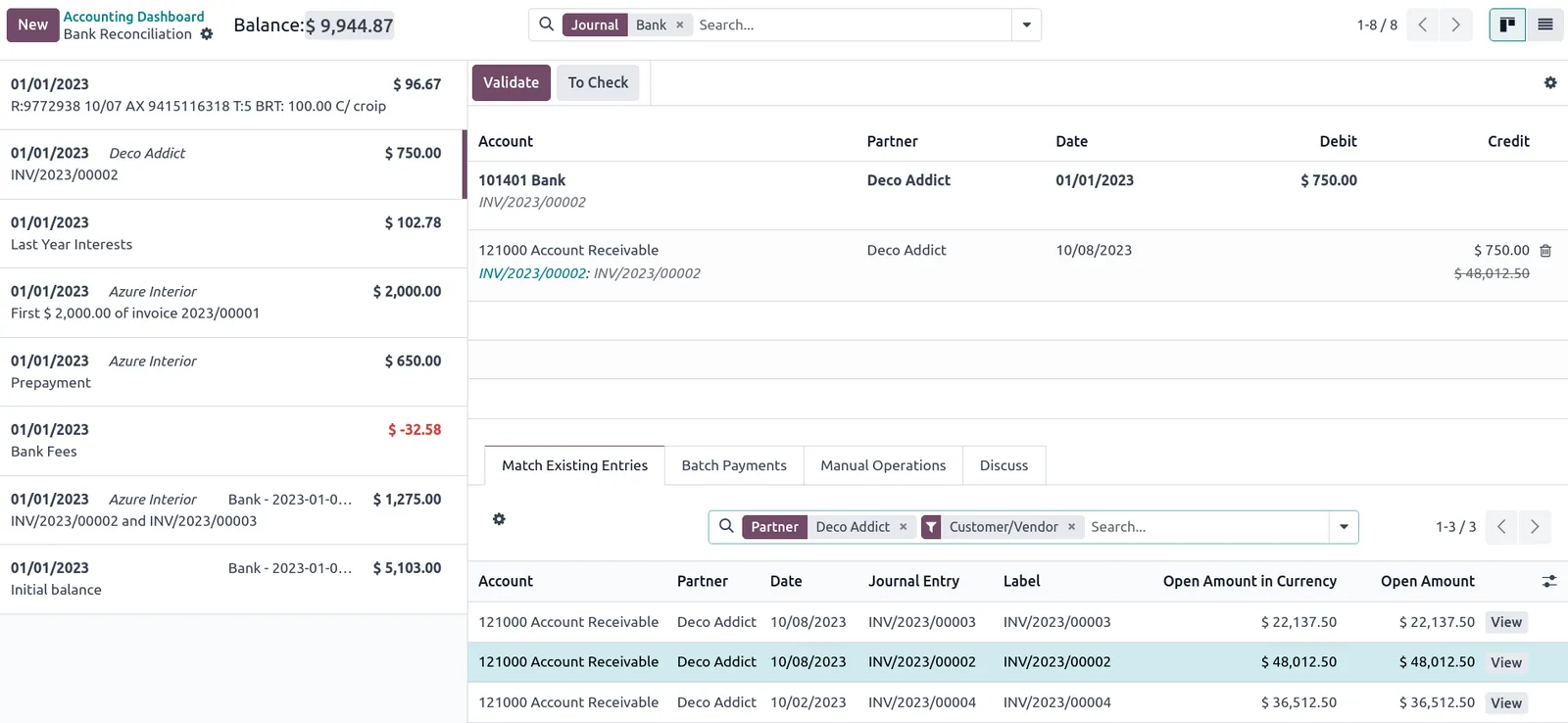
For finance, the most visible differences are in banking and analysis. Odoo reconciles bank statement lines against invoices and bills in a dedicated reconciliation screen, using an outstanding receipts and payments approach that replaces QuickBooks' Undeposited Funds habit. Analytic plans replace classes and locations, and each can be required on specific journals.
As an Odoo Official Partner, we combine data migration with an Odoo implementation so the processes behind the data are designed properly. If you are still weighing options, our Odoo vs QuickBooks comparison sets out the differences honestly.

The products we configure, integrate and support on projects like this one.
 Odoo Invoicing / Accounting
 Odoo Sales
 Odoo CRM
 Odoo Inventory
 Odoo Purchase
 Odoo Manufacturing
Product names and logos are trademarks of their respective owners and are shown only to identify the software we implement.
Teams coming from QuickBooks usually adapt fast, but these specific areas need planning to avoid confusing numbers in the first month.
QuickBooks users are used to creating invoices directly. In Odoo, invoicing policy on each product decides whether invoices follow ordered or delivered quantities, which changes daily routines for sales staff.
Odoo registers a payment against the invoice and then matches it to the bank line. Old QuickBooks deposits combining many payments need to be understood before opening bank balances are set.
If QuickBooks inventory was not used, or was used loosely, Odoo's perpetual valuation will expose differences. A stock count before cut-over gives a reliable opening position.
QuickBooks sub-customers often stood in for projects or sites. In Odoo these may become delivery addresses, child contacts or analytic accounts, depending on how they were used.
Managers used to QuickBooks report layouts need equivalent Odoo views. We rebuild key reports such as profit and loss by class early so trust in the new numbers builds quickly.
Companies invoicing in USD or EUR need Odoo's currency rates and exchange difference journals configured, so open foreign-currency balances carry over correctly.
The core mapping used in our workbook. Odoo terms follow recent versions such as Odoo 17 and 18.
| QuickBooks | Odoo | How we handle it |
|---|---|---|
| Account list | Chart of accounts from the UAE fiscal localization | QuickBooks accounts matched to localized accounts, extras added |
| Customers | Contacts marked as customers | TRN, emirate, payment terms, salesperson, pricelist |
| Sub-customers | Child contacts, delivery addresses or analytic accounts | Based on how jobs were used |
| Vendors | Contacts used on vendor bills and purchase orders | Vendor pricelists added for repeat items |
| Classes | Analytic plan (for example Department) | Applicability rules set per journal |
| Locations | Second analytic plan or a warehouse | Warehouse only if stock is held there |
| Inventory items | Products tracked as inventory | Category sets FIFO or AVCO and stock accounts |
| Non-inventory and service items | Consumable or service products | Income and expense accounts set per product or category |
| Undeposited Funds | Outstanding receipts account | Cleared in QuickBooks before cut-over where possible |
| Open invoices and bills | Customer invoices and vendor bills | Imported with QuickBooks numbers as reference |
| Tax rates and agencies | Taxes linked to the UAE VAT report | Reviewed with your tax advisor |
Five stages, each closed with a reconciliation your finance lead approves.
We agree which Odoo apps to use (usually Accounting, Sales, Purchase, Inventory and CRM), the analytic plans, product categories, invoicing policies and approval rules.
Lists and open items are exported from QuickBooks Online or Desktop. We fix inconsistent names, missing TRNs and duplicate items before converting files to Odoo import format.
Contacts, products, open documents, opening journal entry and opening stock are imported into an Odoo staging copy using external IDs, so the load can be repeated cleanly.
Odoo balance sheet, aged receivable and aged payable reports are compared with QuickBooks for the same date. Bank journals are checked against statements.
The final load runs at the agreed date. Staff begin with quotations and purchase orders in Odoo, and we support the first bank reconciliations and VAT period.
The migration ends with a working Odoo system and a paper trail for your auditor.
Hedged ranges. Companies adding eCommerce, POS or manufacturing in the same project should expect longer.
Durations are typical ranges; your plan is agreed after discovery.
Process mapping and QuickBooks file review.
App configuration, approvals, documents and reports.
Two staging loads with reconciliation each time.
Scenario-based testing by each department.
Cut-over and close support through first month-end.
A shared board in Odoo keeps the migration visible to everyone involved.
Next steps for QuickBooks users looking at Odoo.
We configure the system for the rules UAE businesses report against, and test it before go-live.
General information, not tax or legal advice. Confirm current requirements with the FTA, MOHRE or your advisor. See all UAE compliance guides.
On-site workshops in Dubai, Abu Dhabi and Sharjah, and remote or on-site delivery across the Northern Emirates and free zones.
Official sources and references
Facts on this page were checked against these sources in October 2026. Rules change, so confirm current requirements before acting.
Still have a question? Our consultants are happy to help.
Ask an ExpertStandard Odoo does not include an official QuickBooks connector. Some third-party tools exist, but we generally use exports and Odoo's import tool, because cleaning and mapping decisions matter more than the transfer itself.
They become analytic accounts within one or more analytic plans. You can then report profit by department, branch or project and make the analytic field mandatory on chosen journals.
Yes. Some companies start with Odoo Accounting and Sales, then add Inventory once item data is clean. We plan product categories from the start so adding stock later does not require rework.
Odoo's UAE localization provides VAT taxes and a VAT report organized for the FTA return. How VAT was set up in QuickBooks varies, so each old tax code is mapped and reviewed with your tax advisor.
We list every connected app and decide whether Odoo covers it, whether it needs an integration, or whether it is retired. UAE payroll with WPS files is usually handled in Odoo Payroll or a dedicated payroll tool.
Related Solutions
Related Industries
Related ERP Platforms
Share your QuickBooks setup and we will propose the Odoo apps, migration scope and timeline.
Dubai, United Arab Emirates