L
O
A
D
I
N
G


Zoho, Odoo, ERPNext, Dynamics 365 and custom ERP, delivered by one accountable team.

Change forms, documents, approvals and reports in ERPNext without rewriting it. We customize at the lightest layer that does the job.
ERPNext can be customised for UAE companies mostly without new code, using Customize Form and Custom Fields, Workflows for approvals, Print Formats for bilingual Arabic and English tax invoices with TRN, and Report Builder for management reports. Client and Server Scripts add small rules, while larger logic goes into a custom Frappe app. The lightest layer that meets the requirement is cheaper to maintain.
Standard ERPNext covers a lot, but every company has details it wants handled its own way: a delivery note that shows the driver's mobile and vehicle plate, a purchase order that needs the CFO's approval above a set amount, a tax invoice in Arabic and English with the TRN in a specific place. ERPNext Customization UAE clients ask us for is mostly this kind of work, and most of it needs no new code at all.
ERPNext offers several layers. Customize Form and Custom Fields change what a document holds and shows. Workflows add states and approvals. Print Formats control how documents look on paper and PDF. Report Builder and Query Reports give new views of data. Client Scripts and Server Scripts add small rules. We pick the lightest layer that solves the requirement, because lighter layers are cheaper to maintain and safer during upgrades.
When a requirement is a whole new process rather than a change to an existing one, ERPNext development is the better route. For connecting ERPNext to other systems, see ERPNext integration.

The products we configure, integrate and support on projects like this one.
 ERPNext
 Frappe HR
 Frappe Framework
 Frappe CRM
Product names and logos are trademarks of their respective owners and are shown only to identify the software we implement.
These are the requests we hear most from UAE finance, sales and operations teams.
The default tax invoice layout lacks Arabic labels, your bank details or the fields your customers' accounts teams expect. Payments get delayed while documents are reissued.
Purchase orders and discounts are approved by email or WhatsApp, so there is no record in ERPNext of who approved what and when.
Sales needs the project reference, consultant name or LPO number on orders; operations needs container numbers or vehicle details. Staff type them into the remarks box.
Managers pull standard reports into spreadsheets to add columns or group data differently, every single week.
Users see dozens of fields they never use, so they make mistakes or skip the ones that matter.
Short, controlled changes with sign-off at each step.
We gather change requests from each department with a sample document or screenshot showing the desired result.
Each request is classified: form setting, custom field, workflow, print format, report or script. Anything that needs a new module is flagged for development.
Changes are made on a staging copy and exported as fixtures into your custom app, so they can be reapplied and tracked.
The requesting team tests with real cases, for example a mixed standard and zero-rated invoice or a high-value purchase order.
Approved changes move to production in a planned window, with a short note to users explaining what changed.
A sample of what UAE clients ask for most.
Customization is usually delivered in rounds. Ranges depend on how many requests are in each round.
Durations are typical ranges; your plan is agreed after discovery.
Collect and clarify requests, with sample documents.
Decide the layer for each request and agree priorities.
Fields, formats, workflows, reports and scripts configured and exported as fixtures.
Users test with real scenarios and approve.
Changes deployed in a quiet window with a rollback plan.
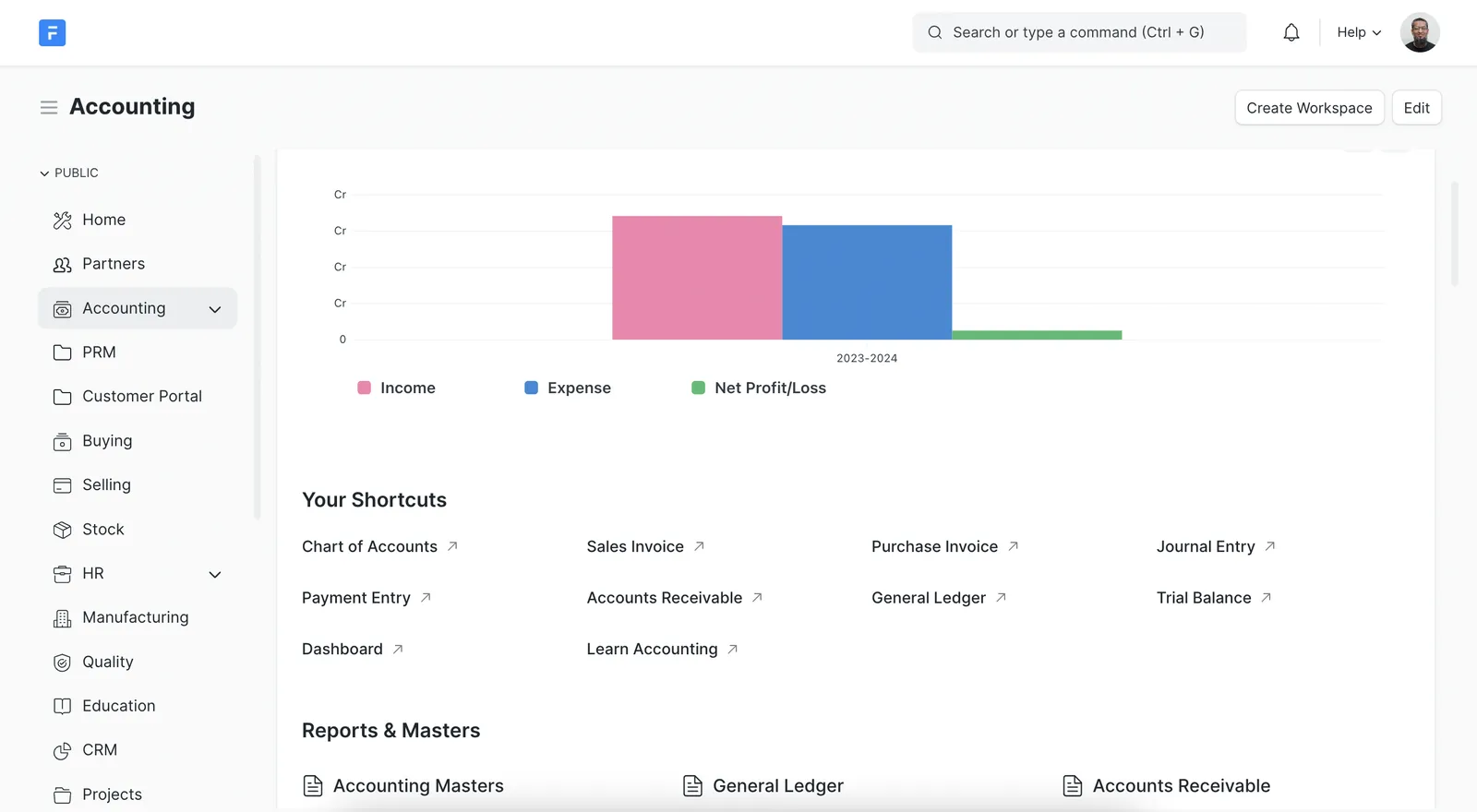
A frequent outcome of customization is an approvals workspace, so managers see what is waiting on them inside ERPNext rather than in their inbox.
Benefits clients notice once ERPNext fits their routine.
Invoices and statements carry the fields customers and auditors expect, so fewer are sent back.
Every approval and rejection is recorded on the document, with time and user.
Reports built in ERPNext replace weekly exports and manual reformatting.
Simpler forms and validation rules reduce errors at the point of entry.
More on tailoring and running ERPNext in the UAE.
We configure the system for the rules UAE businesses report against, and test it before go-live.
General information, not tax or legal advice. Confirm current requirements with the FTA, MOHRE or your advisor. See all UAE compliance guides.
On-site workshops in Dubai, Abu Dhabi and Sharjah, and remote or on-site delivery across the Northern Emirates and free zones.
Official sources and references
Facts on this page were checked against these sources in October 2026. Rules change, so confirm current requirements before acting.
Still have a question? Our consultants are happy to help.
Ask an ExpertCustomizations made through Customize Form, custom fields, print formats and workflows are stored as configuration and usually carry forward. We export them as fixtures in your app and retest scripts and print formats on staging before each major upgrade.
Yes. Print formats use HTML and Jinja, so we can lay out Arabic and English labels side by side, include your TRN and show VAT per line as your tax advisor requires.
Customization changes existing documents and views with built-in tools. Development builds new modules and logic in a custom Frappe app. We classify each request so you pay for the lighter option when it is enough.
Many can, with some training. We often set up the first round, document it and then train your system administrator. See our ERPNext training page for details.
Yes. Trading, contracting, manufacturing and service companies each need different fields, formats and approvals, and we start from what has worked for similar UAE businesses.
Tell us how your business runs today and where it gets stuck. We'll recommend the right platform, outline the implementation approach and give you a realistic timeline, with no obligation.
Dubai, United Arab Emirates